Debugging AI Models Common Issues and Solutions
Learn to identify and resolve common problems encountered when developing and deploying AI models.
Learn to identify and resolve common problems encountered when developing and deploying AI models. This guide will walk you through practical strategies and tools to debug your AI models effectively, ensuring they perform as expected.
Debugging AI Models Common Issues and Solutions
So, you've built an AI model, trained it, and now you're ready to deploy. But wait! It's not performing as expected. Welcome to the world of AI debugging, a crucial yet often overlooked part of the machine learning lifecycle. Debugging AI models isn't like debugging traditional software. It's less about syntax errors and more about understanding data, model behavior, and statistical nuances. This comprehensive guide will dive deep into common issues you'll face and provide practical solutions, tools, and best practices to get your models back on track.
Understanding the AI Debugging Landscape Key Challenges and Mindset
Before we jump into specific problems, let's set the stage. Why is AI debugging so challenging? First, AI models are often 'black boxes.' It's hard to see exactly why a neural network made a particular prediction. Second, data is king, and data issues are rampant. Third, the probabilistic nature of AI means there's no single 'right' answer, making performance evaluation tricky. Finally, the sheer complexity of modern AI architectures adds layers of difficulty. To succeed, you need a systematic approach, patience, and a willingness to iterate.
Common AI Model Debugging Issues Data Problems
Most AI model failures can be traced back to data. Garbage in, garbage out, right? Let's explore the most frequent data-related culprits.
Data Quality Issues Missing Values Outliers and Inconsistencies
The Problem: Your dataset might have missing values, extreme outliers, or inconsistent formatting. These can throw off your model's learning process, leading to poor performance or unexpected behavior.
The Solution:
- Missing Values: Identify them using libraries like Pandas (
df.isnull().sum()). Decide on a strategy: imputation (mean, median, mode, or more advanced methods like K-Nearest Neighbors imputation) or removal of rows/columns if missing data is extensive. - Outliers: Visualize your data (box plots, scatter plots) to spot outliers. Use statistical methods like Z-score or IQR (Interquartile Range) to detect them. Depending on the context, you might cap them, transform them, or remove them.
- Inconsistencies: Standardize data formats (e.g., dates, text casing). Clean categorical variables (e.g., 'USA', 'U.S.A.', 'United States' should all be one category).
Data Leakage Preventing Unfair Advantages
The Problem: Data leakage occurs when information from outside the training dataset is used to create the model, leading to overly optimistic performance metrics on the training set that don't generalize to new, unseen data. This often happens when features are derived from the target variable or when validation/test data inadvertently influences preprocessing steps.
The Solution:
- Strict Separation: Always split your data into training, validation, and test sets before any preprocessing or feature engineering.
- Cross-Validation: Use proper cross-validation techniques (e.g., K-fold cross-validation) to ensure robust evaluation.
- Feature Engineering: Be mindful when creating features. Ensure they only use information available at the time of prediction.
Data Imbalance Addressing Skewed Datasets
The Problem: In classification tasks, one class might have significantly fewer samples than others (e.g., fraud detection, rare disease diagnosis). Models trained on imbalanced datasets tend to be biased towards the majority class, performing poorly on the minority class.
The Solution:
- Resampling Techniques:
- Oversampling: Duplicate minority class samples (e.g., SMOTE - Synthetic Minority Over-sampling Technique).
- Undersampling: Remove majority class samples (use with caution, as it can lead to loss of information).
- Cost-Sensitive Learning: Assign different misclassification costs to different classes.
- Evaluation Metrics: Don't rely solely on accuracy. Use precision, recall, F1-score, and AUC-ROC, especially for the minority class.
Common AI Model Debugging Issues Model Problems
Once you've ruled out data issues, the next place to look is the model itself.
Overfitting and Underfitting Diagnosing Model Complexity
The Problem:
- Overfitting: The model learns the training data too well, including noise and specific patterns, leading to excellent performance on training data but poor generalization to new data.
- Underfitting: The model is too simple to capture the underlying patterns in the data, resulting in poor performance on both training and test data.
The Solution:
- Overfitting:
- More Data: The simplest solution, if feasible.
- Regularization: Add L1 or L2 regularization to penalize large weights.
- Dropout: For neural networks, randomly drop units during training.
- Early Stopping: Stop training when validation performance starts to degrade.
- Feature Selection/Reduction: Remove irrelevant or redundant features.
- Underfitting:
- More Complex Model: Use a more powerful algorithm (e.g., from linear regression to a neural network).
- More Features: Add relevant features or create interaction terms.
- Reduce Regularization: If regularization is too strong.
- Train Longer: For iterative models, ensure sufficient training epochs.
Incorrect Model Architecture or Hyperparameters
The Problem: Choosing the wrong model architecture (e.g., too few layers in a neural network, wrong kernel for an SVM) or suboptimal hyperparameters (learning rate, batch size, number of trees) can severely limit your model's performance.
The Solution:
- Hyperparameter Tuning: Use techniques like Grid Search, Random Search, or Bayesian Optimization (e.g., with libraries like Optuna or Hyperopt) to find optimal hyperparameters.
- Architecture Exploration: Experiment with different model architectures. For deep learning, start with simpler architectures and gradually increase complexity.
- Literature Review: Look at what architectures and hyperparameters have worked well for similar problems in research papers or open-source projects.
Vanishing or Exploding Gradients Deep Learning Specific
The Problem: In deep neural networks, gradients can become extremely small (vanishing) or extremely large (exploding) during backpropagation, making it difficult for the model to learn effectively.
The Solution:
- Vanishing Gradients:
- ReLU Activation: Use ReLU or its variants (Leaky ReLU, ELU) instead of sigmoid or tanh.
- Batch Normalization: Normalizes the inputs to layers, stabilizing learning.
- Residual Connections: (e.g., ResNet) Allow gradients to flow more directly through the network.
- Exploding Gradients:
- Gradient Clipping: Cap the gradients at a certain threshold.
- Smaller Learning Rate: Reduce the step size of optimization.
- Weight Initialization: Use appropriate weight initialization schemes (e.g., He or Xavier initialization).
Common AI Model Debugging Issues Evaluation and Deployment Problems
Even if your model trains well, issues can arise during evaluation or once it's in production.
Incorrect Evaluation Metrics Choosing the Right Lens
The Problem: Relying on a single, inappropriate metric (e.g., accuracy for imbalanced datasets) can give a misleading picture of your model's true performance.
The Solution:
- Understand Your Problem: For classification, consider precision, recall, F1-score, AUC-ROC, and confusion matrices. For regression, use RMSE, MAE, R-squared.
- Business Context: Align your metrics with the business goals. Is false positive or false negative more costly?
- Multiple Metrics: Always evaluate with a suite of metrics.
Model Drift and Concept Drift Adapting to Change
The Problem: After deployment, the relationship between input features and the target variable might change over time (concept drift), or the distribution of input features might change (data drift). This leads to a degradation in model performance.
The Solution:
- Continuous Monitoring: Implement robust monitoring systems to track model performance, input data distributions, and prediction distributions in real-time.
- Retraining Strategy: Establish a clear strategy for retraining your model periodically or when significant drift is detected.
- Online Learning: For some applications, models can be updated continuously with new data.
Deployment Environment Mismatches
The Problem: Your model performs perfectly in your development environment but fails or performs poorly in production. This often stems from differences in dependencies, data formats, or hardware.
The Solution:
- Containerization: Use Docker or similar tools to package your model and its dependencies into a consistent environment.
- Version Control: Track all library versions and model artifacts.
- Reproducible Pipelines: Automate your training and deployment pipelines to minimize manual errors.
- Testing: Thoroughly test your model in a staging environment that mirrors production.
Practical Debugging Tools and Techniques for AI Models
Now, let's talk about the specific tools and techniques that can make your debugging life easier.
Visualization Tools Seeing is Believing
Visualization is your best friend in AI debugging. It helps you understand data distributions, model predictions, and feature importance.
- Matplotlib/Seaborn (Python): For general-purpose plotting of data distributions, correlations, and model outputs.
- TensorBoard (for TensorFlow/Keras) / Weights & Biases (W&B) / MLflow: These are essential for deep learning. They allow you to visualize training metrics (loss, accuracy), model graphs, activations, embeddings, and even compare different experiment runs.
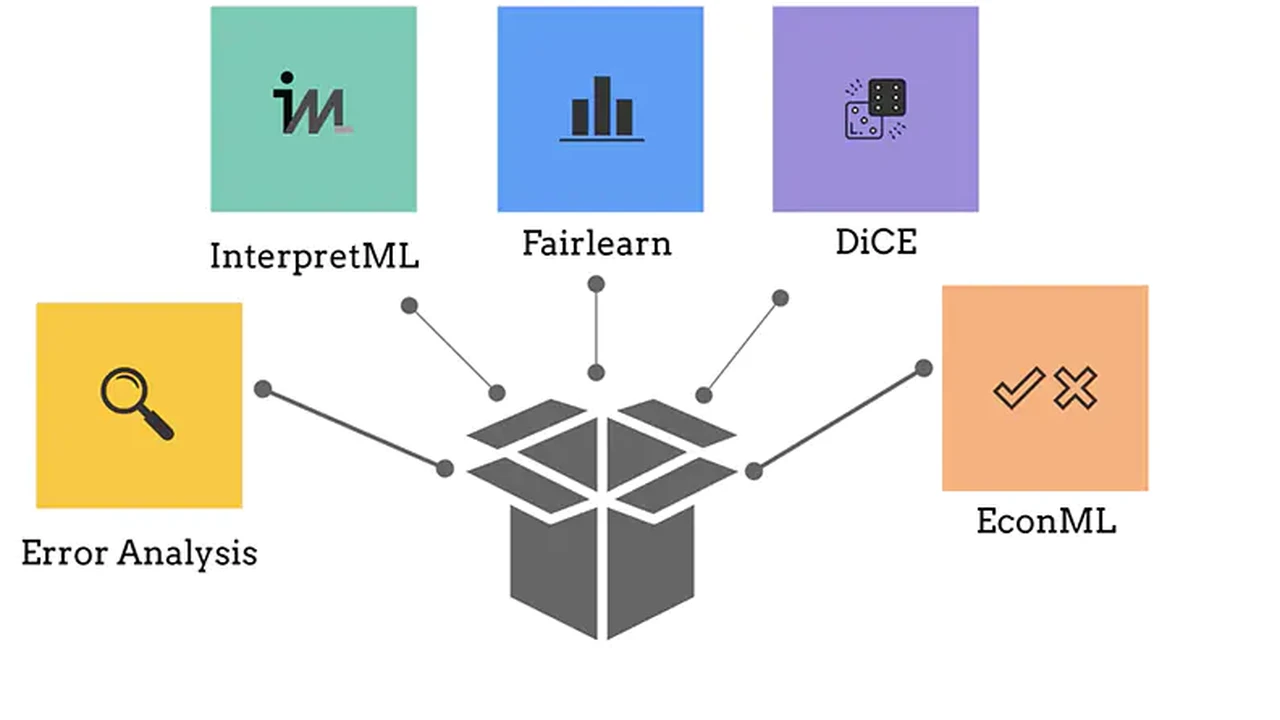
- SHAP (SHapley Additive exPlanations) / LIME (Local Interpretable Model-agnostic Explanations): These libraries help explain individual predictions of complex models, showing which features contributed most to a specific outcome. This is invaluable for understanding why a model made a mistake.
Logging and Monitoring Essential for Production
Once your model is deployed, you need to know what's happening under the hood.
- Standard Logging: Use Python's
loggingmodule to log predictions, input data, and any errors. - Monitoring Platforms: Tools like Prometheus + Grafana, Datadog, or cloud-specific services (AWS CloudWatch, Azure Monitor, Google Cloud Monitoring) can track model performance metrics (latency, throughput, error rates) and data drift in real-time.
- Model Observability Platforms: Dedicated MLOps platforms like Arize AI, WhyLabs, or Fiddler AI offer advanced capabilities for monitoring model performance, data quality, and detecting drift, often with built-in explainability features.
Interactive Debuggers and IDEs
While not specific to AI, traditional debugging tools are still useful for catching code errors in your data preprocessing or model definition.
- VS Code / PyCharm: These IDEs offer excellent Python debugging capabilities, allowing you to set breakpoints, inspect variables, and step through your code.
- Jupyter Notebooks: Great for iterative development and debugging. You can run cells step-by-step and inspect intermediate results.
Recommended Products and Their Use Cases
Let's look at some specific tools that can significantly aid your AI debugging process, along with their typical use cases and pricing models.
1. Weights & Biases (W&B)
Use Case: Experiment tracking, model visualization, and collaboration for deep learning and machine learning projects. W&B helps you log hyperparameters, output metrics, system metrics, and visualize model predictions and gradients. It's fantastic for comparing different model runs and identifying issues like vanishing gradients or overfitting.
Features: Experiment tracking, model versioning, hyperparameter sweeps, system metrics monitoring, media logging (images, videos, audio), custom charts, and reports.
Comparison: More comprehensive than basic TensorBoard for experiment management, offering better collaboration features and a more polished UI. MLflow is a strong competitor, often preferred for its open-source nature and on-premise deployment options, while W&B excels in its hosted service and deep integration with various ML frameworks.
Pricing:
- Free Tier: Generous free tier for individuals and small teams (up to 100 runs/month, 10GB storage).
- Teams: Starts at $50/user/month (billed annually) for more runs, storage, and advanced features.
- Enterprise: Custom pricing for larger organizations with dedicated support and on-premise options.
2. Arize AI
Use Case: AI Observability and monitoring for production machine learning models. Arize helps detect model drift, data quality issues, performance degradation, and provides explainability for predictions in live environments. It's crucial for understanding why a deployed model's performance is dropping.
Features: Data drift detection, concept drift detection, performance monitoring (accuracy, precision, recall, etc.), data quality checks, bias detection, model explainability (SHAP, LIME integrations), alerting, and root cause analysis.
Comparison: Competes with other MLOps observability platforms like WhyLabs and Fiddler AI. Arize is known for its strong focus on explainability and robust drift detection capabilities, often praised for its intuitive UI and comprehensive insights.
Pricing:
- Free Tier: Limited free tier for small-scale monitoring.
- Growth/Enterprise: Pricing is typically based on the number of models monitored, data volume, and features. Custom quotes are provided upon request, often starting in the thousands of dollars per month for production use cases.
3. Deepchecks
Use Case: Validating your machine learning models and data throughout the development lifecycle. Deepchecks helps you catch common errors like data leakage, distribution shifts between train/test sets, and model performance issues before deployment. It's like a unit testing framework for your ML pipeline.
Features: Data integrity checks, train-test distribution validation, model performance validation, data leakage detection, feature importance analysis, and comprehensive reporting.
Comparison: While W&B and Arize focus more on experiment tracking and production monitoring respectively, Deepchecks is strong in the pre-deployment validation phase. It's an open-source library that can be integrated into your CI/CD pipeline, offering a programmatic way to ensure data and model quality.
Pricing:
- Open Source: Free to use.
- Deepchecks Pro: Enterprise version with advanced features, integrations, and support. Pricing is custom and typically for larger organizations.
4. SHAP (SHapley Additive exPlanations)
Use Case: Explaining the output of any machine learning model. SHAP values tell you how much each feature contributes to a prediction, both for individual predictions and globally across the dataset. This is invaluable for debugging models that make unexpected predictions or for understanding model bias.
Features: Model-agnostic explanations, local and global interpretability, various plot types (summary plots, dependence plots, force plots), support for many ML frameworks (scikit-learn, TensorFlow, PyTorch, XGBoost, LightGBM).
Comparison: LIME is another popular interpretability library. SHAP is generally considered more theoretically sound (based on cooperative game theory) and provides consistent explanations, though it can be computationally more intensive for very large datasets.
Pricing:
- Open Source: Free to use. It's a Python library you install via pip.
5. Docker
Use Case: Creating consistent and reproducible environments for your AI models from development to production. Docker containers package your code, runtime, libraries, and dependencies, ensuring that your model runs exactly the same way everywhere.
Features: Containerization, image building, container orchestration (with Docker Compose or Kubernetes), isolation, portability.
Comparison: While not an AI-specific debugging tool, Docker solves a massive class of 'it works on my machine' problems. It's a fundamental tool in MLOps for ensuring deployment consistency, which indirectly aids debugging by eliminating environment-related issues.
Pricing:
- Docker Desktop: Free for personal use and small businesses (up to 250 employees OR less than $10 million annual revenue).
- Docker Business/Team: Paid tiers starting from $5/user/month for larger organizations with commercial use.
Best Practices for Effective AI Debugging
Beyond specific tools, adopting certain practices will significantly improve your debugging efficiency.
Start Simple and Iterate
Don't try to build the most complex model from day one. Start with a simple baseline model (e.g., logistic regression, a small neural network). Get it working, then gradually add complexity. This makes it easier to pinpoint where issues arise.
Reproducibility is Key
Ensure your experiments are reproducible. Use random seeds for all random operations (data splitting, model initialization). Version control your code, data, and model artifacts. Tools like DVC (Data Version Control) can help manage data and model versions.
Unit Testing and Integration Testing
Write unit tests for your data preprocessing functions, custom layers, and evaluation metrics. Implement integration tests for your entire pipeline, from data ingestion to prediction. This catches errors early.
Monitor Everything
In production, monitor not just model performance but also input data distributions, feature drift, and prediction distributions. Set up alerts for anomalies. This proactive approach helps you catch issues before they impact users.
Embrace Explainability
Don't treat your AI model as a black box. Use interpretability tools (SHAP, LIME) to understand why your model makes certain predictions. This insight is invaluable for debugging and building trust in your models.
Document Your Findings
Keep a log of the issues you encounter, the hypotheses you form, the experiments you run, and the solutions you implement. This builds a knowledge base for your team and helps avoid repeating mistakes.
Collaborate and Seek Feedback
AI debugging can be tough. Don't hesitate to ask for help from colleagues or the wider AI community. Sometimes a fresh pair of eyes can spot something you missed.
Debugging AI models is an art as much as a science. It requires a deep understanding of your data, your model, and the problem you're trying to solve. By systematically approaching issues, leveraging the right tools, and adopting best practices, you'll become much more effective at building robust and reliable AI systems. Happy debugging!
:max_bytes(150000):strip_icc()/277019-baked-pork-chops-with-cream-of-mushroom-soup-DDMFS-beauty-4x3-BG-7505-5762b731cf30447d9cbbbbbf387beafa.jpg)