The 7 Best AI Video Editing Software for Beginners
Explore user-friendly AI video editing tools to create professional-looking videos without extensive experience.
Explore user-friendly AI video editing tools to create professional-looking videos without extensive experience.
The 7 Best AI Video Editing Software for Beginners
Hey there, aspiring content creators and video enthusiasts! Ever felt overwhelmed by the complexity of traditional video editing software? You're not alone. The good news is, artificial intelligence is here to revolutionize the way we create videos, making it easier and more accessible than ever before. AI video editing tools are designed to automate tedious tasks, suggest creative enhancements, and even generate content, allowing beginners to produce professional-looking videos without years of experience or a steep learning curve. Let's dive into the top 7 AI video editing software options that are perfect for anyone just starting out.
Why AI Video Editing for Beginners is a Game Changer
Traditional video editing can be a daunting task. Learning complex timelines, understanding intricate effects, and mastering color grading often requires significant time investment. AI changes this by simplifying the process. Imagine an AI that can automatically cut out silences, add background music, generate captions, or even suggest the best clips for your story. This automation frees you up to focus on the creative aspects, making video creation enjoyable and efficient. For beginners, this means less frustration and more fantastic videos.
How AI Video Editing Works Simplified
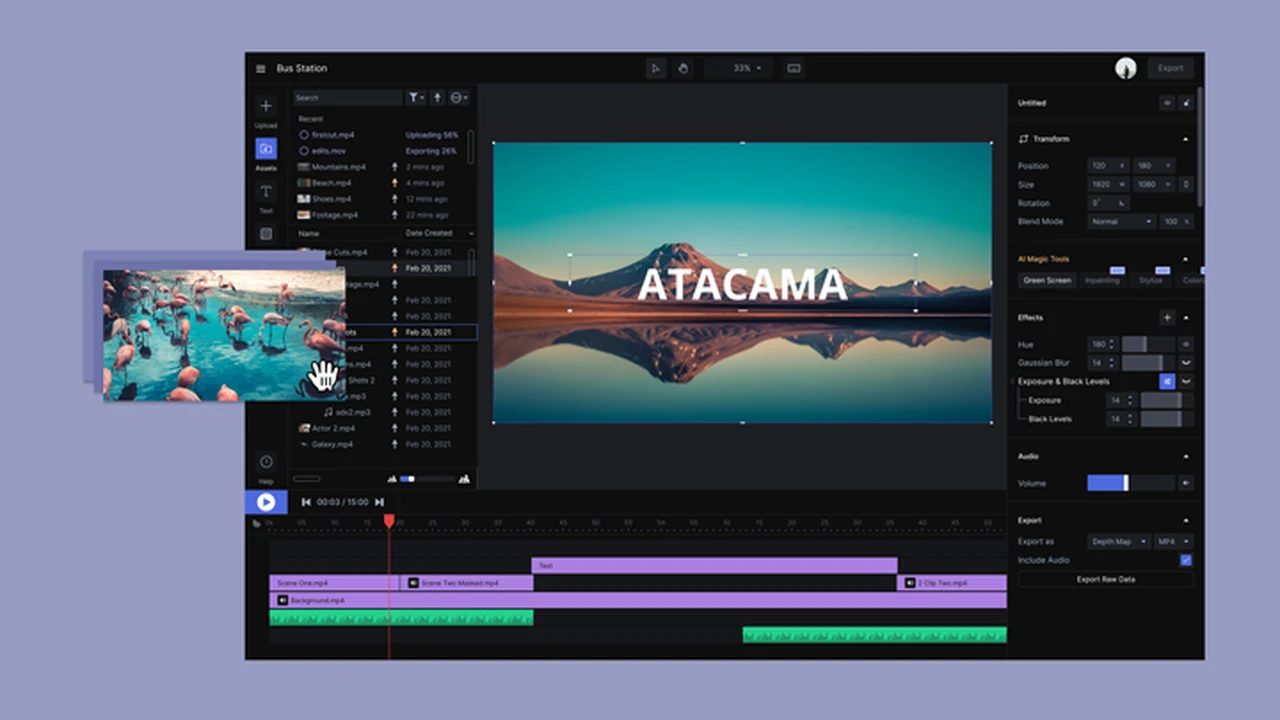
At its core, AI video editing leverages machine learning algorithms to analyze your footage. It can identify faces, objects, scenes, and even emotions. Based on this analysis, the AI can perform various tasks: from automatically syncing audio and video, to suggesting optimal cuts, applying smart color corrections, and generating text overlays. Some advanced AI tools can even create entire video drafts from a simple text prompt or a collection of raw clips. It's like having a personal editing assistant right inside your software.
Top AI Video Editing Software for Beginners and Their Features
Let's get to the good stuff! Here are our top picks for AI video editing software that are perfect for beginners, along with their key features, ideal use cases, and pricing information.
1. InVideo AI The All in One AI Video Creator
InVideo AI is a fantastic choice for beginners because it focuses heavily on text-to-video creation. You simply type in your script or idea, and InVideo's AI generates a video complete with stock footage, music, and voiceovers. It's incredibly intuitive and requires minimal video editing knowledge.
- Key Features: Text-to-video conversion, extensive stock media library, automated voiceovers, smart scene creation, easy drag-and-drop interface.
- Use Cases: Social media videos, marketing ads, explainer videos, quick content creation for blogs or websites.
- Comparison: Unlike traditional editors, InVideo AI prioritizes speed and automation. It's less about granular control and more about rapid content generation. Compared to other AI tools, its text-to-video capabilities are particularly strong for beginners.
- Pricing: Free plan available with watermarks. Paid plans start around $15/month for more features and no watermarks.
2. Pictory AI Transform Text into Engaging Videos
Pictory AI is another excellent tool for turning long-form content like blog posts, articles, or scripts into engaging videos. Its AI automatically selects relevant visuals, adds captions, and can even summarize content for shorter video versions. It's perfect for content marketers and bloggers.
- Key Features: Article-to-video conversion, script-to-video, automatic captioning, video summarization, vast media library.
- Use Cases: Repurposing blog content, creating social media snippets, generating quick news updates, educational videos.
- Comparison: Similar to InVideo AI in its text-to-video focus, but Pictory excels at summarizing and extracting key points from existing text, making it ideal for content repurposing.
- Pricing: Free trial available. Paid plans start around $19/month.
3. Descript AI The AI Powered Audio and Video Editor
Descript is unique because it treats video editing like document editing. You edit your video by editing its transcript. If you delete a word in the transcript, that word is cut from the audio and video. Its AI features include automatic transcription, filler word removal, and 'Overdub' for voice cloning. It's a game-changer for podcasters and anyone working with spoken content.
- Key Features: Transcript-based editing, automatic transcription, filler word removal (uhms, ahs), 'Studio Sound' for audio enhancement, 'Overdub' voice cloning.
- Use Cases: Podcasts, interviews, webinars, online courses, YouTube videos with lots of dialogue.
- Comparison: Descript stands out with its revolutionary transcript-based editing. While other tools focus on visual automation, Descript masters audio and spoken content editing, making it incredibly efficient for dialogue-heavy videos.
- Pricing: Free plan with limited transcription hours. Paid plans start around $12/month.
4. FlexClip AI Online Video Editor for Quick Creations
FlexClip is an online video editor that integrates AI features to simplify the creation process. It offers AI text-to-video, AI image generation, and a vast library of templates. It's very user-friendly and great for quick, professional-looking videos without software downloads.
- Key Features: AI text-to-video, AI image generator, extensive template library, stock media, easy drag-and-drop interface, cloud-based editing.
- Use Cases: Marketing videos, social media posts, event invitations, short promotional clips.
- Comparison: FlexClip is a strong all-rounder for online AI video editing. It balances ease of use with a good range of AI-powered creative tools, making it more versatile than some single-purpose AI tools.
- Pricing: Free plan with watermarks. Paid plans start around $9.99/month.
5. CapCut AI Mobile and Desktop Video Editing
CapCut has exploded in popularity, especially among TikTok and short-form video creators. While it started as a mobile app, its desktop version is equally powerful. It offers a surprising array of AI features, including automatic captioning, background removal, body tracking, and intelligent stabilization. It's incredibly intuitive and packed with trendy effects.
- Key Features: Auto-captions, background removal (chroma key), body tracking, intelligent stabilization, vast library of trendy effects and filters, multi-track editing.
- Use Cases: TikTok videos, Instagram Reels, YouTube Shorts, personal vlogs, quick social media content.
- Comparison: CapCut excels in its mobile-first approach and its integration of trending social media features. Its AI tools are geared towards making short-form video creation fast and visually appealing, often surpassing other free mobile editors.
- Pricing: Mostly free, with some premium features available through CapCut Pro subscription (around $7.99/month).
6. Synthesys AI Studio for Realistic AI Avatars and Voiceovers
Synthesys takes AI video creation to another level by allowing you to generate videos with realistic AI avatars and human-like voiceovers. You type your script, choose an avatar, and the AI generates a video of the avatar speaking your text. This is perfect for presentations, e-learning, and corporate communications where a human presenter is desired without the need for filming.
- Key Features: AI avatar generation, realistic human-like voiceovers (text-to-speech), custom branding, multiple languages, background customization.
- Use Cases: Explainer videos, e-learning modules, corporate training, marketing videos, news updates.
- Comparison: Synthesys is in a different league compared to the others, focusing on synthetic media. It's not for editing existing footage but for creating entirely new videos from text using AI-generated presenters.
- Pricing: Plans start around $39/month for basic features, scaling up for more advanced options.
7. HeyGen AI Video Generation with AI Avatars and Voices
Similar to Synthesys, HeyGen specializes in creating professional videos with AI avatars and voices from text. It's known for its high-quality avatars and natural-sounding voiceovers, making it a strong contender for businesses and educators looking to produce engaging video content without complex production. It also offers a 'Talking Photo' feature where you can animate a still image to speak your script.
- Key Features: AI avatar video generation, realistic text-to-speech, custom avatar creation, 'Talking Photo' feature, multi-language support, various templates.
- Use Cases: Marketing videos, corporate communications, e-learning, product demos, social media ads.
- Comparison: HeyGen and Synthesys are direct competitors in the AI avatar video generation space. HeyGen often gets praise for its user interface and the naturalness of its AI voices and avatar movements.
- Pricing: Free plan with limited video duration and watermarks. Paid plans start around $29/month.
Choosing the Right AI Video Editor for Your Needs
With so many great options, how do you pick the best one for you? Consider these factors:
Your Primary Goal and Content Type
Are you making short social media clips (CapCut)? Repurposing blog posts (Pictory)? Creating professional presentations with avatars (Synthesys, HeyGen)? Or do you need an all-rounder for various projects (InVideo AI, FlexClip)? Your main goal will heavily influence your choice.
Ease of Use and Learning Curve
Since you're a beginner, prioritize tools with intuitive interfaces and minimal learning curves. All the tools listed here are beginner-friendly, but some are even simpler than others for specific tasks.
Budget and Pricing Models
Many offer free trials or free plans with limitations. Test them out before committing to a paid subscription. Consider if a monthly or annual plan makes more sense for your usage.
Specific AI Features You Need
Do you absolutely need automatic captions? Voice cloning? Text-to-video? Make a list of your must-have AI features and check which software offers them effectively.
Integration with Other Tools
Think about your existing workflow. Does the AI video editor integrate well with other tools you use for content creation or marketing?
Tips for Beginners Using AI Video Editing Software
Even with AI doing much of the heavy lifting, a few tips can help you get the most out of these tools:
- Start Simple: Don't try to create a Hollywood blockbuster on your first try. Begin with short, simple videos to get comfortable with the software.
- Experiment with Prompts: If using text-to-video tools, play around with your text prompts. The more descriptive and clear your prompt, the better the AI's output will be.
- Leverage Stock Media: Most of these tools come with vast libraries of stock photos, videos, and music. Use them to enhance your content without needing to shoot everything yourself.
- Review and Refine: AI is smart, but it's not perfect. Always review the AI-generated content and make manual adjustments to ensure it aligns with your vision.
- Focus on Your Story: Even with AI, the core of a great video is a compelling story. Use AI to help you tell that story more effectively, not to replace your creative input.
- Learn Basic Editing Principles: While AI automates much, understanding basic principles like pacing, shot composition, and audio quality will still elevate your videos.
The Future of Video Editing with AI
The landscape of video editing is rapidly evolving, and AI is at the forefront of this transformation. We're seeing continuous advancements in AI's ability to understand context, generate realistic visuals, and even predict user preferences. Soon, AI might be able to create entire video narratives from minimal input, personalize content for individual viewers, or even generate interactive video experiences. For beginners, this means an even lower barrier to entry and more powerful tools at their fingertips. It's an exciting time to be a video creator!
So, there you have it! A comprehensive look at the best AI video editing software for beginners. Whether you're looking to create engaging social media content, professional presentations, or simply want to explore the world of video creation, these tools offer an accessible and powerful way to bring your ideas to life. Happy editing!
:max_bytes(150000):strip_icc()/277019-baked-pork-chops-with-cream-of-mushroom-soup-DDMFS-beauty-4x3-BG-7505-5762b731cf30447d9cbbbbbf387beafa.jpg)